

 |
|
AddaButton lets you add buttons directly
to Internet Explorer's own toolbar which can be used to launch any program
or document on your computer. Easy-to-use interface allows you to define
the button text, icon, associated "Tools" menu command text,
and even the text to be displayed in I.E.'s status bar when the mouse
cursor is over the menu command. New in this version is the ability
to use the default icon of the program you wish the added button to
launch as the button's icon.
Buttons can be optionally added to I.E.'s toolbar for only the current Windows user profile or for all users if your system is configured for more than one Windows user profile. Buttons can also be deleted or their properties edited from within the program at any time after they have been added. Note: After using the program to add buttons to I.E.'s toolbar, I.E. will need to be restarted if it is running for them to show up. If the new button(s) are not visible, you will need to open I.E.'s toolbar customization dialog by right-clicking anywhere on the toolbar and selecting "Customize" from the menu that appears. Select the new button(s) from the list of "Available Buttons" on the left and click the "Add" button in the center. Close the dialog and the new button(s) will be added. |
|
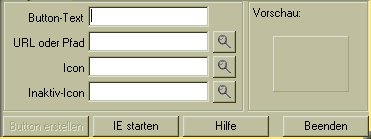
IE Buttonizer: come sopra ma in tedesco e più
leggero (241Kb)
|
 |
|
Il
freeware è riservato ai Cittadini di
 |
|
|
Se
non lo sei ancora, clikka per leggere i dettagli
|
Quando
esce il form, inserisci Id e Password
|
 |
 |
|
Ti
ricordiamo anche che nessuna comunità vive se tutti i suoi
membri si limitano a prendere. Psicopolis si basa sullo scambio, quindi
ogni tanto dai un tuo contributo: NON SOLDI ma un intervento sulle
bacheche, oppure qualche materiale utile o una segnalazione interessante.
|
|
|
Attenzione,
se trovi il server occupato, riprova in orari diversi. Se hai difficoltà
a scaricare o ricevi un file corrotto,
.
Ogni programma è stato controllato con antivirus, ma Psicopolis
non risponde del funzionamento del software, che è reperito
in rete.
|
|