Welcome to OneLook® Dictionary Search
Think of this web site as a search engine for words and phrases:
If you have a word for which you'd like a definition or translation,
we'll quickly shuttle you to the web-based dictionaries that
define or translate that word. If you don't know how to spell
the word, we'll help you do that too. No word is too obscure:
More than 5 million words in more than 900 online dictionaries
are indexed by the OneLook® search engine.
What can you do at OneLook.com?
- Define words: Type a word into the search box on
the front page to retrieve a list
of dictionary web sites that define that word. Be sure "Find
definitions" is selected.
- Translate words: Type a word into the search box
and select "Find translations" to retrieve a list of dictionary
web sites that have translations of that word into
other languages.
- Find words: Type a pattern consisting of
letters and the wildcards * and ? to retrieve
a list of words matching your pattern. The asterisk (*)
matches any number of letters or symbols. The question mark
(?) matches exactly one letter or symbol. (More info on wildcards.)
You can explore the other links above this box for more information
on OneLook.com. (Don't forget to check out our cool customization features!)
Please read our FAQ
or send us feedback
if you have any questions. When you're ready to try it out,
simply return to the front
page. |
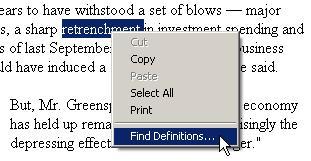 Access OneLook® Dictionary Search
from any site! Access OneLook® Dictionary Search
from any site!
Internet Explorer users on Windows, click here
to install a "right click" menu option that lets you define
any word on any web page.
To complete the installation, select "Open this file from its
current location" after you click on the link above. Then hit
"OK" and/or "Yes" to confirm the registry setting change (don't
worry, it's completely harmless!)
You'll then need to open a new browser window or restart IE
in order for the feature to take effect. Next time you're stumped
by a word on the Web, simply highlight it, click your right
mouse button, and choose "Find Definitions..." from the menu,
as shown above. (As an added bonus, you'll also be able to type
ol word into your IE address bar to look
up "word" in OneLook.)
Instructions on how to uninstall
this add-on are available. |
Privacy policy
No personally identifying information is ever collected on this
site. In some cases, you may voluntarily provide personal information
in response to a specific query or by filling out a form such
as the feedback form below. This information is not passed on
to advertisers or used for any purpose other than what is stated.
This site uses cookies only to
store the customization information that you can set via the
"Customize" link at the top of this page. If you wish to disable
cookies in your browser, follow the steps outlined in one of
these documents: Internet
Explorer, Netscape,
AOL.
We use third-party advertising companies to serve ads when you
visit our web site. These companies might separately place or
recognize a cookie file on your browser in the course of delivering
advertisements to this site. These companies may use information
(not including your name, address email address or telephone
number) about your visits to this and other Web sites in order
to provide advertisements about goods and services of interest
to you. If you would like more information about this practice
and to know your choices about not having this information used
by these companies, please click here: http://www.sonar.com/content/privacy.htm.
You may choose to suppress banner advertisements on this site
on the Customize page.
Please note: There are no popup advertisements
on OneLook.com. |
|